Holiday rental owners rarely receive completely unexpected questions. Parking arrangements, heating controls, Wi-Fi access, household appliances and local recommendations generate enquiries because guests need practical information at specific moments. Even when a detail appears in the property listing, visitors may still be unsure whether it answers their particular situation.
The solution is not simply to write longer descriptions or send more automated messages. It is to build a reliable self-service information system that makes accurate answers easy to find before booking, before arrival and throughout the stay. A useful guest FAQ combines clear property information, practical instructions, accessible formats and regularly checked local recommendations.
Repeated enquiries should also be treated as operational feedback. They reveal where information is missing, ambiguous, difficult to retrieve or outdated. By examining actual guest questions and organising answers around real situations, owners can reduce avoidable correspondence while helping visitors make informed decisions and feel more confident about their accommodation.
What should a holiday rental guest information system include?
- Clear answers to recurring questions about parking, heating, appliances, access and household facilities.
- A searchable, mobile-friendly FAQ supported by printed information for essential instructions.
- A simple update process based on repeated enquiries, guest feedback and verified local information.
- Why Do Guests Keep Asking About Parking When It Is Mentioned in the Listing?
- How Can You Create a Guest FAQ for Heating, Parking and Household Appliances?
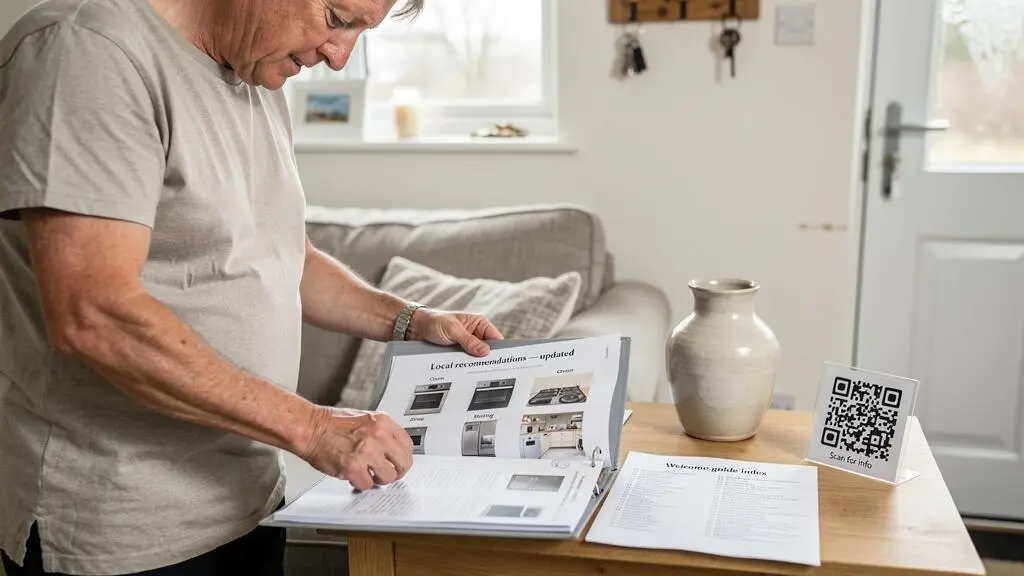
- Printed Welcome Folder or Digital FAQ: Which Works Better for Older Guests?
- The Outdated Local Recommendation That Can Frustrate Holiday Rental Guests
- When Should Repeated Guest Questions Trigger an Update to Your Property FAQ?
- How Can You Make a Digital Guest Handbook Easier to Navigate on a Mobile Phone?
- Automated Messages or Personal Replies: Which Do Holiday Rental Guests Prefer?
- How Can Clear Guest Communication Prevent Misunderstandings During Holiday Stays?
Why Do Guests Keep Asking About Parking When It Is Mentioned in the Listing?
Guests keep asking about parking because seeing a parking reference in a listing is not the same as knowing exactly what to expect. A phrase such as “parking available” does not establish whether the space is private, free, reserved, suitable for a large vehicle or guaranteed throughout the stay. Visitors often seek confirmation before committing to a booking, particularly when travelling with children, luggage or more than one car.
This distinction between information being present and information being retrievable at the right moment is important. A guest may have read the listing but forgotten a detail, overlooked it among other amenities or remained uncertain about its practical meaning. The question is therefore not always evidence of an absent answer. It can indicate that the existing wording has not removed the uncertainty.
Repeated parking enquiries also provide useful evidence about the effectiveness of a listing. Owners can review their last ten enquiries and identify which practical details generate the most follow-up messages. If parking dominates that list, it deserves greater visibility and more precise wording.
There is also a booking consideration. A visitor comparing several properties may favour the one that explains its facilities most clearly. Unresolved questions introduce friction into the decision, even when the property itself meets the guest’s requirements. The Irish Competition and Consumer Protection Commission explains that accommodation should match the description provided at booking and that consumers should receive accurate information before making their decision. Its CCPC guidance on holiday accommodation and consumer rights provides an Ireland-specific reference for this principle, rather than a universal statement of law across English-speaking countries.
Owners should also examine the exact wording used in their listings:
- “Parking available”: Does this mean a private driveway, a shared car park or public parking?
- “Nearby parking”: How far away is it, and is it free or paid?
- “Street parking possible”: Are spaces guaranteed, restricted or subject to local permits?
- “Access to parking”: Does the guest have a reserved space or simply access to a communal facility?
A practical test is to read each sentence as a cautious first-time visitor. Ask what the guest would need to know before arriving, rather than assuming that the wording is self-explanatory. Where possible, state the exact location, restrictions, charges and access arrangements.
Parking is only one example of a wider communication problem. Once the most common uncertainties have been identified, the next step is to turn them into useful answers covering the property as a whole.
How Can You Create a Guest FAQ for Heating, Parking and Household Appliances?
A useful holiday rental FAQ should be built from real guest enquiries, not simply from the facilities owners believe deserve an explanation. Start with pre-booking messages, arrival questions, reviews and in-stay support conversations. Group recurring questions by when guests need the answer, then write practical instructions that explain exactly what they can do, what restrictions apply and whom to contact if something goes wrong.
This approach prevents the FAQ from becoming a generic list of property features. A guest does not need another statement that the accommodation has central heating or a washing machine. They need to know how to operate the equipment, where to find the controls and what to do if the expected result does not occur.
Three categories deserve particular attention.
Heating: Explain the heating system, thermostat location, operating instructions and whether guests control the temperature themselves. If heating is separately metered or subject to additional charges, make the arrangement explicit before booking. Avoid implying that a particular temperature or operating schedule is guaranteed if that depends on the equipment or property conditions.
Parking: Specify the exact parking location, whether the space is private or shared, any vehicle-size restrictions, access codes, permits and arrangements for additional cars. Include a photograph or simple annotated location image where the entrance is difficult to identify.
Household appliances: Identify unfamiliar equipment such as induction hobs, wall ovens and washing machines. A photograph showing the actual control panel, accompanied by two or three clear operating steps, is often more useful than a long paragraph. Explain any essential safety precautions without overwhelming the guest with unnecessary technical detail.
An FAQ entry should pass a simple test: does the answer remove the need to ask? Repeating “parking available” fails because it does not resolve the practical question. An effective entry explains where to park, whether payment is required, what restrictions apply and what to do if the designated space is occupied.
Accuracy also depends on maintenance. An appliance FAQ can become misleading when an owner replaces a washing machine, changes the thermostat or installs a different oven. Adding a photograph of the current model and a last-checked date makes it easier to spot outdated instructions. Owners should update the image and operating steps whenever the equipment changes.
To make the first version manageable, prioritise questions according to their origin:
- Before booking: Facilities, costs, parking arrangements, accessibility and property limitations.
- Before arrival: Directions, access codes, heating instructions, check-in arrangements and essential equipment.
- During the stay: Appliance troubleshooting, waste disposal, Wi-Fi problems, maintenance contacts and emergency information.
This structure also determines where each answer should appear. A parking cost belongs in the listing and pre-booking information, while a photograph showing the correct parking entrance belongs in the arrival instructions.
Five steps to build a practical holiday rental FAQ
- Review the last ten guest enquiries and produce a list of recurring questions, with their original wording.
- Sort each question into before booking, before arrival or during the stay, creating a three-stage content inventory.
- Write one practical answer for each priority question, specifying costs, restrictions, locations and next steps where relevant.
- Photograph the actual heating controls, parking entrance and unfamiliar appliances, then match each image to its corresponding instruction.
- Add a last-checked date to changeable information and create a record of the FAQ entries that need updating when property equipment or arrangements change.
A well-written FAQ does not need to be complicated. Its value comes from solving real problems with instructions that remain accurate, understandable and easy to retrieve in the right format.
Printed Welcome Folder or Digital FAQ: Which Works Better for Older Guests?
Neither a printed welcome folder nor a digital FAQ is automatically better for older holiday rental guests. The most reliable solution is often a combination: provide printed access to essential arrival and emergency information, while using a digital handbook for content that changes frequently or benefits from photographs and links. The choice should reflect the property’s connectivity, guest requirements and the type of information being shared.
Age should not be treated as a reliable indicator of someone’s digital preferences. Some older visitors are confident smartphone users, while some younger guests prefer printed instructions they can consult without opening an application. A useful information system accommodates different preferences rather than assuming that one format suits everyone.
Each format has practical limitations.
| Criterion | Printed welcome folder | Digital FAQ |
|---|---|---|
| Accessibility | Can be opened immediately without a device or login. | Can support adjustable text size and device accessibility settings. |
| Connectivity | Works without Wi-Fi or mobile data. | May depend on connectivity unless content is available offline. |
| Updates | Requires replacement or reprinting of outdated pages. | Can be updated centrally without replacing printed material. |
| Navigation | Can be difficult to search in a thick folder. | Can offer searchable content and direct links when designed properly. |
| On-arrival access | Remains available at its designated location. | Can be difficult to retrieve if the original message or link is lost. |
For digital material, accessibility depends on more than choosing a large font. The UK Home Office‘s guidance on accessible page layout and typography recommends readable typography, consistent page structures, responsive layouts and text resizing. It also addresses maintaining functionality at up to 400% zoom and supporting portrait and landscape orientations. These are general digital design recommendations, not a comparative study of holiday rental handbooks.
Age UK also explains how users can enlarge text and interface elements on compatible smartphones and tablets, as well as use features such as text-to-speech. Its advice on making digital devices easier to use offers practical accessibility guidance without suggesting that all older people have the same requirements.
For a holiday rental, a digital handbook should therefore be accessible without requiring guests to create an account, install unfamiliar software or search through multiple messages. A simple link, readable headings and the option to access essential information offline can make a considerable practical difference.
The property’s profile should also influence the format decision:
- Short stays: Keep essential arrival instructions immediately accessible, with a concise printed reference where appropriate.
- Longer stays: A digital handbook can make detailed household instructions and changing local information easier to maintain.
- Unreliable connectivity: Provide printed essentials and consider an offline copy of the digital information.
- Frequent content changes: Keep recommendations and variable information in an easily updated digital section.
- Guests with different accessibility needs: Offer alternative ways to access important instructions instead of relying on one device or format.
A practical compromise is a printed one-page index inside the property. It can identify the location of the full welcome folder, explain how to access the digital handbook and direct guests to immediate assistance when needed.
Once the format is decided, owners should pay particular attention to information that changes independently of the property itself, especially recommendations for restaurants, shops and local attractions.
The Outdated Local Recommendation That Can Frustrate Holiday Rental Guests
An outdated local recommendation can frustrate guests because they often treat the host’s handbook as a trusted source of practical information. A restaurant that has closed, a market with changed operating days or an attraction with seasonal opening arrangements can turn a seemingly helpful suggestion into a wasted journey. The problem is not simply an incorrect detail; it is the absence of a reliable process for checking information before sharing it.
Local information has a different lifespan from household instructions. The location of a fuse box or the operation of a fixed heating system may remain unchanged for years. Restaurant opening hours, public transport arrangements, local events and seasonal services can change much more frequently.
It is useful to separate recommendations into two groups.
Relatively stable recommendations include beaches, established walking routes, viewpoints and public landmarks. These may remain useful over longer periods, although access restrictions, maintenance work and safety conditions can still change.
Time-sensitive recommendations include restaurants, cafés, markets, seasonal attractions, festivals and local services. Their availability, opening days, prices and operating arrangements need more frequent verification.
VisitBritain, the official tourism organisation for Britain, notes that business opening hours vary and that some shops, restaurants and attractions may operate reduced hours on public holidays. Its practical information for visitors to Britain advises checking individual businesses’ published opening times. This is a useful basis for maintaining recommendations, although its guidance concerns Britain rather than every English-speaking destination.
For property owners, a sensible verification routine is to:
- Check time-sensitive recommendations at the beginning of each tourist season.
- Verify opening hours and availability directly through the business’s current information.
- Recheck an entry whenever a guest reports that the information is incorrect.
- Remove or amend recommendations when a business closes or changes its services.
- Record when each recommendation was last verified.
Feedback from housekeeping teams, property managers and local contacts can make this process easier. People who regularly visit the property or surrounding area may notice closures and changes before the owner does. Guests can also be invited to report outdated recommendations through a short note in the handbook or a message to the host.
There is an important trust consideration. If visitors follow an outdated recommendation, they may become less confident about other information in the handbook. This does not establish that one incorrect restaurant suggestion will necessarily undermine every instruction, but it illustrates why practical guidance should be maintained consistently.
Separating local recommendations from stable property instructions makes updates easier. A clearly dated local guide can be replaced without rewriting the household section, and guests can immediately see when the information was last checked.
Local information requires periodic checking, while recurring guest enquiries provide a more immediate signal that the property’s existing information system needs attention.
When Should Repeated Guest Questions Trigger an Update to Your Property FAQ?
Repeated guest questions should trigger an FAQ update when they reveal a persistent gap, ambiguous wording or information that guests cannot find. Owners can establish a practical internal threshold, such as adding an entry after the same question has been asked three times. The exact number is an operational choice, not a scientifically established industry standard, and some important misunderstandings justify immediate action.
A trigger-based approach is more useful than relying on a vague instruction to review the handbook regularly. It links updates to observable problems and gives owners a clear reason to change a specific entry.
Three different situations require different responses.
1. Missing information. Guests ask about something the listing and handbook do not explain. For example, several visitors want to know whether a second car can use the property’s parking arrangements. The appropriate response is to add a clear explanation of the available options and restrictions.
2. Ambiguous information. The answer exists, but different guests interpret it differently. A statement such as “heating is available” does not explain how the thermostat works or whether guests can adjust it. The answer needs rewriting rather than simply adding another paragraph elsewhere.
3. Information that is difficult to find. Guests ask a question that is already answered clearly, but the information is buried in a long document or placed under an unexpected heading. Moving it to a more visible location or improving navigation is more effective than adding duplicate text.
Owners should also monitor inconsistent answers. If two separate guest messages receive different explanations about the same facility, the FAQ may not provide a sufficiently clear reference for the host or support team. Similarly, a review describing confusion about check-out, parking or equipment should be treated as evidence worth investigating.
However, every new question should not automatically produce another FAQ entry. An information system that grows indefinitely can become as difficult to navigate as the original listing. Additions need to be balanced by regular pruning:
- Merge duplicate questions into one comprehensive answer.
- Remove information that is no longer relevant.
- Rewrite unclear answers instead of preserving several competing versions.
- Move high-frequency questions to the first screen or main index.
- Retain low-frequency but important safety and emergency information even when it is rarely requested.
A lightweight tracking system is usually sufficient. Owners can maintain a note on their phone or use message labels to record recurring topics. A complex spreadsheet is unnecessary if it creates more administration than the owner can realistically sustain.
Each recorded question can include its topic, when it arose and whether the answer already existed. This makes it easier to distinguish missing, ambiguous and difficult-to-find information.
Once the information has been improved, the next challenge is ensuring that visitors can actually retrieve it, particularly when they are using a smartphone during their stay.
Key considerations before improving the guest information system
- Prioritise the questions that create uncertainty or affect booking decisions, rather than treating every topic as equally important.
- Distinguish between missing answers, unclear explanations and navigation problems before changing the FAQ.
- Keep essential information accessible and accurate while removing unnecessary duplication that makes the handbook harder to use.
How Can You Make a Digital Guest Handbook Easier to Navigate on a Mobile Phone?
A digital guest handbook should be designed around the way visitors actually use their phones: quickly, often with one hand and usually while trying to solve a practical problem. Someone standing beside an unfamiliar washing machine needs the correct operating instructions immediately, not a lengthy introduction or a complicated document structure. Organise information by situation, keep navigation simple and make essential answers visible without unnecessary scrolling.
A conventional handbook often follows the owner’s priorities: property description, facilities, house rules, local information and contact details. However, guests tend to search by immediate need. They want to know how to adjust the heating, connect to Wi-Fi, dispose of rubbish or find the electricity meter.
Organising the content around these situations reduces the effort required to find an answer.
A mobile-friendly handbook should include the following elements:
- A short, clickable contents page: Use direct links to heating, parking, Wi-Fi, appliances, waste disposal and emergency information.
- One main topic per page or section: Avoid long continuous documents where unrelated instructions are mixed together.
- Short, practical explanations: State the action first, then add restrictions or troubleshooting advice.
- Photographs of actual equipment: Show the control panel, switch, appliance or physical location guests need to identify.
- Important information near the top: Make Wi-Fi details, access instructions and other essential facts easy to find.
Photographs are especially useful when written descriptions can be interpreted in several ways. A picture of the correct thermostat or fuse box can help a visitor identify the equipment without guessing which device the instructions refer to.
Discoverability is another essential consideration. Sending a PDF three days before arrival does not guarantee that guests will still be able to locate it when they need it. The handbook should be available through a reliable route after check-in.
Possible access methods include:
- A welcome message containing a clearly labelled, reusable handbook link.
- A QR code placed inside the property, linking directly to the relevant digital information.
- A shortcut on a tablet provided for guest use, where appropriate.
- A printed index showing where to find the most important digital instructions.
Each option has limitations. A QR code requires a working phone camera and an accessible internet connection if the destination is online. A tablet may be unavailable or unfamiliar to some visitors. A message link can be lost among other communications. Providing an alternative route to essential information helps prevent these problems.
Offline availability is particularly useful where mobile coverage or Wi-Fi reliability is uncertain. Owners can provide a downloadable version or printed essentials so that guests are not left without instructions when connectivity fails.
Accessibility should be tested on different screen sizes and orientations. Readable typography, clear headings, sufficient spacing and responsive layouts make information easier to use. Owners should avoid relying on fixed text sizes that prevent visitors from adjusting content through their device settings.
A simple usability test can reveal problems before the next booking. Give the digital handbook to someone unfamiliar with the property and ask them to find three specific details, such as the Wi-Fi password, the heating instructions and the rubbish collection arrangements. Ask them to complete the task without assistance and note where they hesitate.
Every failed search indicates a navigation or information problem worth correcting. The objective is not to make the handbook look sophisticated but to make it useful when visitors need it most.
Clear digital information reduces avoidable enquiries, but it does not eliminate the need for human support. Owners still need to decide which communications can be automated and which require a personal response.
Automated Messages or Personal Replies: Which Do Holiday Rental Guests Prefer?
Holiday rental guests generally need different communication approaches at different stages of their stay. Automated messages work well for predictable, factual information such as booking confirmations, arrival instructions and check-out reminders. Personal replies are more appropriate when visitors ask specific questions, report problems or expect an apology. The most effective approach combines automation for consistency with human attention when understanding and judgement matter.
The distinction is not simply between automated and personal communication. It concerns the nature of the message and what the guest expects to happen next.
A scheduled arrival message can provide access instructions, parking details and a link to the digital handbook without requiring the owner to send the same information individually to every booking. Similarly, a standard departure reminder can explain check-out time and the agreed procedure.
However, a guest reporting that the heating is not working needs more than a generic acknowledgement. The response should address the specific issue, establish what has happened and explain what the owner will do next.
Using automation for every situation creates a detectability problem. Guests can often recognise when a response is simply a template that does not address their question. Receiving an irrelevant automated message after reporting a practical problem may suggest that nobody is paying attention.
A useful communication framework distinguishes three categories:
| Message type | Recommended approach | Reason |
|---|---|---|
| Booking confirmation | Automated | Provides consistent booking information. |
| Pre-arrival instructions | Automated with personalised details | Shares predictable operational information. |
| Check-out reminder | Automated | Reinforces established departure arrangements. |
| Specific guest question | Personal reply | Addresses the actual circumstances. |
| Complaint or maintenance issue | Personal reply | Requires assessment, action and follow-up. |
| Apology or unexpected change | Personal reply | Requires accountability and appropriate judgement. |
A hybrid communication process can follow the predictable timeline of a booking while reserving personal contact for the moments that most influence the guest experience:
- Welcome: A personal greeting can confirm that the guest has arrived and knows how to get help.
- Mid-stay check-in: Where appropriate, a brief message can invite visitors to mention anything that needs attention.
- Problem resolution: A person should assess the issue, explain the response and confirm whether it has been resolved.
Owners who cannot reply immediately can use an automated acknowledgement that sets a realistic expectation. For example, a message can confirm receipt and state when a human response is expected. This is more useful than allowing a guest to assume that a message has been ignored.
The response time should reflect the seriousness of the issue. An urgent safety or access problem needs a clearly communicated assistance route, rather than an ordinary acknowledgement followed by an extended wait.
Even with the right communication tools, misunderstandings can still occur when important expectations have never been explained. The final part of an effective information system is therefore making property rules and responsibilities clear before they become sources of disagreement.
How Can Clear Guest Communication Prevent Misunderstandings During Holiday Stays?
Clear guest communication prevents misunderstandings by making important expectations explicit before visitors arrive. House rules, noise restrictions, cleaning responsibilities, visitor policies and shared-space arrangements should be explained in specific, accessible language. When guests know what is expected, what is included and how to report a problem, there is less room for conflicting interpretations during the stay or after departure.
Many disagreements begin with assumptions rather than deliberate non-compliance. An owner may believe that “leave the property tidy” clearly explains the expected check-out condition, while guests interpret it as simply removing personal belongings. Similarly, visitors may not realise that a terrace, garden or parking area is shared with other occupants.
These expectations should be communicated at three distinct moments.
Before booking: Explain the actual characteristics and limitations of the accommodation. This includes shared facilities, accessibility constraints, potential noise, sleeping arrangements, visitor restrictions and any important conditions that could influence the booking decision.
Before arrival: Provide operational instructions covering access, parking, heating, appliances, rubbish disposal and check-in arrangements. Guests should know what to do before they reach the property, rather than having to request essential information after arrival.
During the stay: Make it clear how guests can report a problem, who to contact and what response to expect. A maintenance issue reported early can often be investigated while the guest is still at the property. The same issue raised only after departure may become a source of dissatisfaction that could have been addressed sooner.
Wording is especially important for sensitive house rules. Instructions should describe observable actions rather than rely on subjective expressions.
| Vague wording | More practical wording |
|---|---|
| Please leave the property tidy. | Remove personal belongings, place used towels in the designated basket and dispose of household rubbish in the marked bins before departure. |
| Please respect quiet hours. | Keep noise to a minimum between the property’s stated quiet hours, particularly in shared areas. |
| Visitors are restricted. | Only registered guests may stay overnight. Contact the host before inviting additional visitors. |
| Use shared spaces responsibly. | Return shared equipment to its designated location after use and leave communal areas clear for other occupants. |
The exact wording must reflect the property’s actual arrangements and any applicable local requirements. Owners should not introduce restrictions that contradict their booking conditions or imply that a facility is private when it is shared.
Communication should also establish a simple escalation habit. A short mid-stay message asking whether everything is going well gives guests an opportunity to report small issues before they become more serious. It should be an invitation to communicate, not an unnecessary interruption or an attempt to pressure guests into giving positive feedback.
When a problem is reported, acknowledge the specific concern, explain the next step and provide a realistic indication of when the guest can expect an update. If the initial solution does not work, follow up rather than assuming the issue has disappeared.
This approach also helps owners identify recurring operational weaknesses. Several complaints about the same facility may indicate that the instructions need rewriting, the equipment needs maintenance or the original property description needs correcting.
A well-maintained guest information system is therefore more than a collection of answers. It connects accurate booking information, accessible instructions, appropriate communication and ongoing feedback. Owners can begin with their most frequently asked questions, improve the answers that create uncertainty and review the system whenever the property or guest experience changes. That creates a practical foundation for more confident bookings and better-supported stays.
What information should a holiday rental welcome folder contain?
A holiday rental welcome folder should contain essential arrival information, Wi-Fi access, parking arrangements, heating and appliance instructions, waste disposal guidance, emergency contacts, house rules and relevant local recommendations. Include a clear index so guests can locate information quickly. Keep time-sensitive details dated and provide a digital alternative where practical.
How often should a holiday rental guest handbook be reviewed?
Review the handbook whenever property equipment, access arrangements, prices or house rules change. Local recommendations should be checked periodically, particularly before the start of a tourist season. Repeated guest questions, conflicting answers and reviews mentioning confusion should also trigger an immediate review of the relevant information.
Should holiday rental owners send the guest handbook before arrival?
Yes, sharing relevant information before arrival helps guests prepare and resolve practical questions in advance. Provide essential details such as access arrangements, parking and check-in instructions at an appropriate time. Make the handbook available again inside the property through a printed copy, accessible link or other convenient method, rather than relying exclusively on an earlier message.
How can owners reduce repetitive guest messages without making communication impersonal?
Create a practical FAQ covering recurring questions and automate predictable messages such as booking confirmations, arrival instructions and check-out reminders. Keep personal replies for specific questions, complaints, unexpected changes and maintenance problems. An automated acknowledgement can also confirm receipt of a message while explaining when a human response will follow.
What is the best way to keep local recommendations accurate for holiday rental guests?
Separate relatively stable recommendations, such as established walking routes, from time-sensitive information about restaurants, markets and seasonal attractions. Check current opening hours through individual business information, review recommendations before each tourist season and amend entries when guests or local contacts report changes. Adding a last-verified date helps visitors understand how current the information is.